How to save .shsh2 blobs with online with TSSSaver [in 5 steps]
In jailbreaking shsh blobs are very important, they are the tickets to downgrade or upgrade your iOS device. This comes extremely handy when you need to jailbreak bur Apple has closed the signing window for that version of iOS you wish to upgrade or downgrade to.
Whenever Apple releases a new iOS firmware it allows the users to download it for a week or in some cases two-three weeks before closing out the signing window after which you will not be able to downgrade or upgrade to the any other version. Apple uses this technique to prevent users to jailbreak or because Apple doesn't want their users to be on a old iOS version as it is more vulnerable to bugs.
Here is how you can save your .shsh2 blobs (newer version of .shsh) online, without any further ado lets get started.
If you have successfully saved your .shsh2 blobs you just need to sit back and relax you may need not to worry because if Apple closes the signing window for any particular iOS version you just need to use the .shsh2 blobs and Prometheus tool to downgrade or upgrade.
Whenever Apple releases a new iOS firmware it allows the users to download it for a week or in some cases two-three weeks before closing out the signing window after which you will not be able to downgrade or upgrade to the any other version. Apple uses this technique to prevent users to jailbreak or because Apple doesn't want their users to be on a old iOS version as it is more vulnerable to bugs.
Here is how you can save your .shsh2 blobs (newer version of .shsh) online, without any further ado lets get started.
- First of all connect your iOS device to a PC.
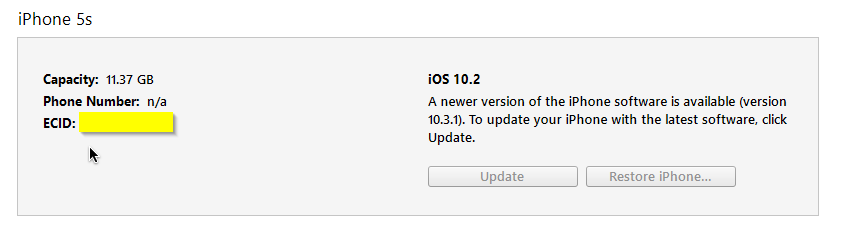
- Launch iTunes and go click on your device icon at the top, now here you will see all the information about your device. Click on the Serial Number until you see your ECID, just right click it and copy it.
- Now open your browser and go to this site : https://tsssaver.1conan.com/
- Here paste your ECID number you just copied and Select HEX. Now select iPhone Model if you want you could also generate .shsh2 blobs for your iPod, iPad, Apple TV. After selecting the model number click on Submit button.

- Now you will see a link like above in the image, click on it and now you will see a directory consisting of all the iOS versions that you could downgrade or upgrade to, just click on the Download ZIP or you may also want to save them to your preferred cloud service.


If you have successfully saved your .shsh2 blobs you just need to sit back and relax you may need not to worry because if Apple closes the signing window for any particular iOS version you just need to use the .shsh2 blobs and Prometheus tool to downgrade or upgrade.
I used this method to re-jailbreak method, I was just installing a tweak and it was not compatible with the iOS 10.2 jailbreak and made my device bricked, then I waited and do some research on how I could downgrade to iOS 10.2 then I first installed iOS 10.3 beta 1 on my device (using iTunes) and then using the Prometheus tool I finally downgrade from iOS 10.3 beta 1 to iOS 10.2.
So yeah .shsh blobs can really make your day if you really want to downgrade or upgrade.

Comments
Post a Comment